How to Onboard a New Client (Without Dubsado): Step-by-Step Tutorial and Template for Coaches + Consultants

Client onboarding should be boring and profitable, just like everything else in your business! In this post I’m sharing the best client onboarding workflow for small business owners.
This simple client onboarding system has clear steps, no complicated software, and absolutely NO need for software like Dubsado.
If you’re like other service providers, you’re probably thinking:
- “I want more clients… but also, ugh, the admin.”
- “I know my onboarding is kind of a mess but I don’t have time to fix it.”
- “Everyone keeps telling me to set up Dubsado or HoneyBook and I would literally rather eat my laptop.”
Note: I am going to show you how to set up your client onboarding without using an all-in-one platform like Dubsado or Honeybook. Those platforms are fantastic, but they are not necessary. I want you to understand what you do need so that you can make the best, most informed decision.
What do you actually need?
- A simple set of tools (that you likely already have!)
- A clear sequence of steps
- And a repeatable template your brain will actually use when you’re tired, busy, or mildly overwhelmed.
In this post, I’m going to walk you through exactly how to onboard a new client without Dubsado using a straightforward software stack you probably already have (or can set up in a day).
You’ll get:
- A step-by-step onboarding workflow
- My recommended software stack (no all-in-ones required)
- A free client onboarding template you can plug into your own business
By the end, you’ll have a “click this, send that” system so that when a new client says “I’m in!”, you’re not scrambling to find your contract, invoice, or welcome email. You’ll just run the system.
Boring and profitable. Exactly how we like it around here!
The Only 3 Tools You Really Need for Easy Client Onboarding
(Client Booking + Onboarding Software Stack Overview)
Most “client onboarding systems” tutorials start by throwing 12 different platforms at you.
I’m not doing that to you. Because you don’t need that.
To onboard a new client smoothly, you only need three core tools:
- A welcome email – this is the pillar of your onboarding (free template below)
- A contract/signing tool – to cover yourself legally-speaking
- A payment processor – to send invoices and collect the money
That’s it!
It’s super simple and takes like 10 minutes to do for each client (which you’d have to do in an all-in-one client management software anyway).
How to Onboard a New Client (Step-by-Step Tutorial)
This is the same process I teach service providers Yay for Clients and The Six Figure Sprint — and it’s designed to work even if you’re busy, neurodivergent, juggling multiple projects, or just allergic to admin (like me!)
You might be surprised to learn that the best client onboarding starts before the invoice is made.
In fact, your client onboarding process starts the second the client says “I’m in!” during your booking call.
NOTE: A “booking call” is part of what I call your “Lazy Sales System”. You will need a Lazy Sales System set up in order for the onboarding process to flow seamlessly! Click here to watch the free masterclass where I teach you how to build yours!
The beauty of the Lazy Sales System is that the transition from sales to onboarding is totally seamless.
You’re going to get off of your “booking call” (I talk about this at the masterclass here) and then send 3 things:
#1 – Welcome Email 📧
#2 – Contract 🖋️
#3 – Invoice 🧾
⭐ Step 1: Send the Welcome Email (This Sets the Entire Tone)
This is the very first touchpoint after the verbal “yes,” and it’s the most important one.
Your welcome email does ALL the heavy lifting:
What the welcome email includes:
- A warm congratulations + confirmation that they’re officially in 🎉
- What needs to happen next (sign contract + pay invoice)
- The timeline of your work together
- Your communication boundaries
- Link and deadline for any pre-work
What you need:
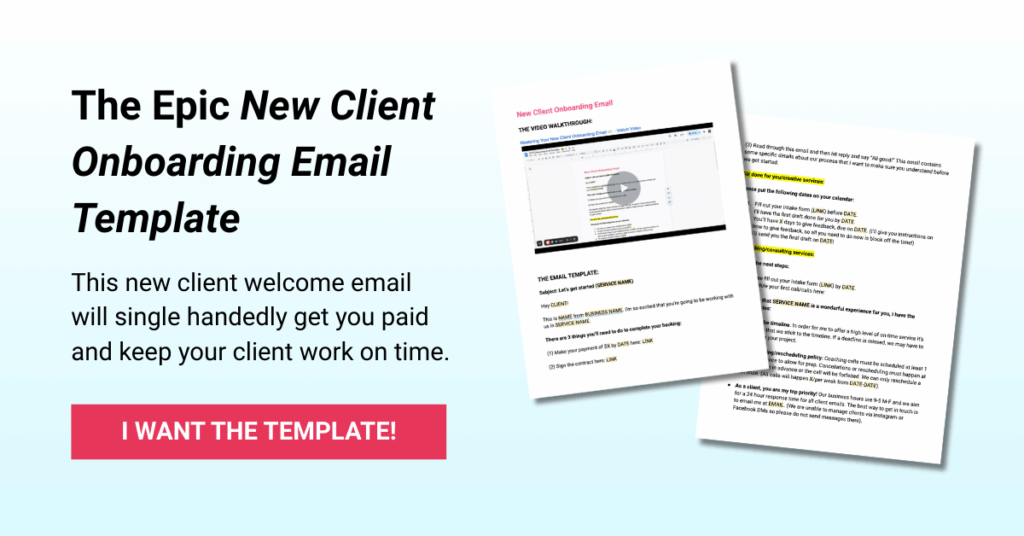
Welcome email template – Draft your welcome email template and keep it in a Google Doc where you can refer to it whenever you book a new client.
I pulled my *perfect* client welcome email template out of my paid program to share with you for free. There’s also a short video where I go over why every element of the email matters!
👉 Click here to get the free Client Welcome Email Template!
⭐ Step 2: Send the Contract (Keep This as Simple as Humanly Possible)
The contract is the container that protects BOTH of you and creates clarity. It is absolutely necessary!
Note: I am not a lawyer and cannot give legal advice. But I highly recommend getting a professionally made contract from The Contracts Market (affiliate link)!
There are lots of software platforms out there for getting contracts signed like:
- HelloSign (Dropbox Sign)
- DocuSign
- Adobe Sign
How to use Google eSignature to send client contracts:
Did you know that Google Workspace also has a way for you to sign documents electronically? It’s called Google eSignature and it is SO easy to use!
Just open your contract in Google Docs and go to Tools > eSignature. Then drag and drop the eSignature elements you need onto the doc and click “request signature” to send it to your client.
⭐ Step 3: Send the Invoice (Payment Secures Their Spot)
This goes out immediately after (or attached to) the welcome email.
There are lots of options for sending invoices like:
- Stripe
- Wave
- PayPal
- QuickBooks
I personally recommend starting simple and sending invoices with Stripe.
You can set up an invoice template with Stripe to use over and over again with clients.
👉🏼 Watch Stripe’s invoice template tutorial here!
⭐ Step 4: Set Up the Client Internally (Your Client Management System Starts Here!)
Once your client has signed their contract and paid their invoice, the final onboarding step is getting everything set up internally so your delivery runs smoothly.
This internal setup ensures you’re not flying by the seat of your pants. And it sets the stage for consistent, repeatable client delivery that could actually be passed off to a Virtual Assistant or what I like to call a “Junior Expert”.
👉 In the next post in this series, I’m going to teach you EXACTLY how to manage clients without using an all-in-one platform.
Your client onboarding might end here, but your delivery system starts in the next post!
Free Client Onboarding Email Template (Swipe This Exact Welcome Email)
The welcome email is the pillar of your entire client onboarding workflow. It sets the tone, tells your client what happens next, and keeps the process simple for both of you.
This is the same welcome email I use and the same one my students in Yay for Clients and The Six Figure Sprint rely on to onboard clients effortlessly — without needing complicated portals or 20 different automations.
👉 Click here to download the free Client Onboarding Email Template
It will save you hours, reduce admin stress, and make you look extremely put-together (even on your busiest weeks).
Ready to Turn Client Onboarding Into a Client-Booking Machine?
If you want onboarding that feels smooth, easy, and totally non-stressful — that starts the moment someone says “I’m in” — then the real key isn’t more software. It’s your sales system. And that’s exactly what the free Build Your Client Booking Machine Masterclass is for.
In the masterclass, I’ll teach you how to build:
- ✅ A Signature Service — the $1K-minimum offer your ideal clients want (that doesn’t feel like you’re working for cheap).
- ✅ A Lazy Sales System — a 3-part conversion flow that turns most of your leads into paying clients without pushy sales calls, awkward DMs, or spreadsheets of shame.
- ✅ A Client Magnet — a marketing & booking ecosystem that brings in clients consistently, so you’re not stuck chasing referrals or random leads.
👉 Register here to join the free Build Your Client Booking Machine Masterclass.
How to Onboard a New Client FAQ:
What is the simplest way to onboard a new client?
The simplest way to onboard a new client is to use a clear, three-step system:
- send a welcome email,
- send the contract, and
- send the invoice.
Once the client completes those steps, set them up internally in your delivery system (Google Drive + your project management tool). You don’t need complicated software — just a repeatable workflow you can run in minutes.
Do I need Dubsado to onboard clients?
No — you absolutely do not need Dubsado (or any all-in-one platform) to onboard clients.
Tools like Dubsado and HoneyBook are helpful, but they’re optional. You can onboard clients quickly and professionally using simple tools you already have: a scheduler, a contract-signing tool, and a payment processor.
A streamlined setup is often easier to manage, especially if you’re new, busy, or neurodivergent.
What should be included in a client onboarding workflow?
A strong client onboarding workflow should include:
- A welcome email with next steps
- A contract for the client to sign
- An invoice to secure their spot
- A clear timeline or expectations
- Any pre-work or materials they need
- Your internal setup (Drive folder, project, deadlines)
That’s it. If you can send these items and set the client up internally, you have an effective onboarding system.
What software do I need to onboard clients as a coach or consultant?
You only need three core tools to onboard clients as a coach or consultant:
- a scheduling tool (Calendly, Acuity, or Google Calendar),
- a contract-signing tool (HelloSign, Dropbox Sign, or Google eSignature), and
- a payment processor (Stripe, PayPal, Wave, or QuickBooks).
These three tools cover everything you need to send, sign, and get paid quickly — no all-in-one CRM required.
How do I send a contract and invoice to new clients?
Send your contract through an e-signature platform like HelloSign, Dropbox Sign, DocuSign, or Google eSignature.
Once the contract is signed, send an invoice using a simple tool like Stripe, Wave, or PayPal.
Many service providers include both links in the welcome email to keep everything in one place and make the process easier for the client.
Check out these resources:
👉 🎧 Listen to my podcast — Yay for Business
High-impact episodes for service providers who want simple systems and six-figure energy.
👉 📸 Follow me on Instagram (@courtneychaal)
Daily stories, spicy takes, mini-trainings, and behind-the-scenes of running a simple, profitable service business.
👉 🎁 Grab all my freebies on the “Free Shit” page
Tools, templates, trainings, and shortcuts to help you get clients faster.
👉 💼 Apply to work with me!
If you’re ready for clients on repeat and a business that feels light — applications are always open.
👉 ⚡ Take the Booked in 5 Days Challenge
Learn my fast client-booking system and get your next lead in the door within a week.
👉 💬 Get the “Get Clients from the DMs” Workshop
Learn how to open conversations, nurture leads, and get clients from DMs without ever being weird.